Gradius IV PRG ROMグラディウスIVのPRGロム
Drag your ROM file (837c01.27p) here.ここにROMファイル(837c01.27p)をドラッグしてください。
Page loading...
Patch Options改造オプション
These set the power-on defaults. Everything except Boot Options can also be changed in-game in MOD OPTIONS (in the TEST MENU — F2 in MAME). ここでは電源投入時の初期値を設定します。起動オプション以外は、ゲーム内のMOD OPTIONS(テストメニュー=MAMEではF2)でも変更できます。
Boot Options起動オプション | |
|
Skip RTC Error prompts and boot straight into game.RTCエラーをスキップする(時間を設定しなくて良い)。
|
Skip RTC ErrorRTCエラーをスキップする |
|
Skip wait on "JVS NOT FOUND" message.起動を速く:「JVS NOT FOUND」表示の待ち時間を短縮(JAMMA筐体)。ハード初期化には触れません。
|
Skip JVS NoticeJVS通知をスキップ |
|
Show a progress bar while booting.起動中(通常は黒画面)に「NOW LOADING」進行バーを表示。待ち時間を再利用するので起動は遅くなりません。
|
Boot Progress Bar起動プログレスバー |
Training練習機能 | |||||||||||||||||||||||||||
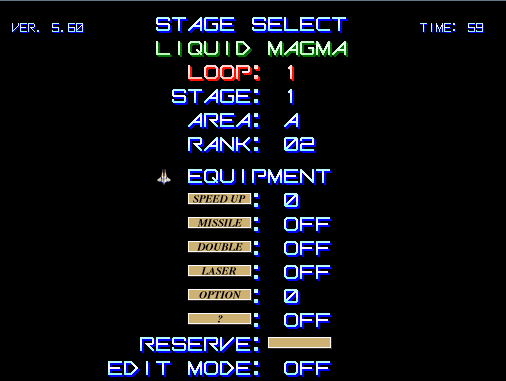 New ver. — to enter: press any button + 1P Start.
New ver. — 任意のボタンを押しながら1Pスタート。 Old ver. — before Start, hold a button (stage) / move the joystick (loop): 旧 ver. — スタート前にボタン長押し(ステージ)/レバー(ループ):
|
Stage Selectステージセレクト | ||||||||||||||||||||||||||
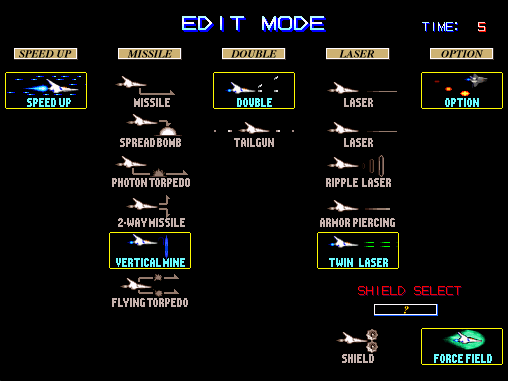 EDIT Mode is added to Stage Select.EDITモードがステージセレクトに追加。 |
Edit Modeエディットモード追加 | ||||||||||||||||||||||||||
|
Continue is normally disabled on Stage 9.普段だと9面コンティニューが不可能。
|
Enable Stage 9 Continue9面コンティニュー可 | ||||||||||||||||||||||||||
R.OptionRオプション | |
|
Rotation speed of the R.Option ring (the rotating-option EDIT equipment), in frames per revolution — lower = faster. Only affects play when R.Option is equipped via EDIT mode. This dropdown is the power-on default; also adjustable in-game in MOD OPTIONS > R.OPTION.Rオプション(回転オプション、EDITモードの装備)の回転速度。1周あたりのフレーム数で、小さいほど速い。EDITモードでRオプションを装備したときのみ影響します。ここは電源投入時の初期値。ゲーム内のMOD OPTIONS > R.OPTIONでも調整可能。
|
R.Option Rotation SpeedRオプション回転速度 |
|
R.Option ring SIZE control via the expand button (EDIT mode). PRESS: hold moves the size one way, release fixes it. CYCLE: hold sweeps the size up and down, release fixes it (Gradius III-style auto feel). Inert until the expand button is used; with fewer than 4 options the size is pinned. This dropdown is the power-on default; also switchable in-game in MOD OPTIONS > R.OPTION.拡張ボタンによるRオプションのリング半径(サイズ)操作(EDITモード)。PRESS:押している間サイズが一方向に動き、離すと固定。CYCLE:押している間サイズが上下にスイープし、離すと固定(グラディウスIII風の自動的な感覚)。拡張ボタンを使うまでは無効。オプションが4個未満のときはサイズ固定。ここは電源投入時の初期値。ゲーム内のMOD OPTIONS > R.OPTIONでも切替可能。
|
R.Option Expand ModeRオプション拡縮モード |
|
Hold a bound 2P-side button to control the R.Option ring. TRC (2P-1/2/3): the ring self-rotates, hold to park it. ROT (2P-1/2/3): Gradius V-style — the ring is parked, hold to rotate it. The number picks which 2P button (1/2/3) is the bound line; requires a 2P button wired to it. Off = no control. This sets the power-on default; also switchable in-game in MOD OPTIONS > R.OPTION.割り当てた2P側ボタンを押している間、Rオプションの回転を操作します。TRC(2P-1/2/3):リングは自動回転し、押している間だけ停止。ROT(2P-1/2/3):グラディウスV式 — リングは停止しており、押している間だけ回転。数字はどの2Pボタン(1/2/3)を使うかの指定で、その線に2Pボタンの配線が必要です。Off=操作なし。ここは電源投入時の初期値。ゲーム内のMOD OPTIONS > R.OPTIONでも切替可能。
|
Option Control (2P button)オプションコントロール(2Pボタン) |
Game Balanceゲームバランス | |
|
Pick up "double" or "laser" again while equipped to revert to normal shot.ダブル・レーザー装備中にもう一度取るとノーマルショットに戻る。
|
Return to Normal Shotノーマルショットに戻れる |
|
At max speed (5), the speed-up button drops you back to the selected speed (0-4) instead of doing nothing. This dropdown is the power-on default; also adjustable in-game in MOD OPTIONS > GAME BALANCE.最高速(5)でスピードアップを押すと、何も起きない代わりに選択した速度(0~4)に戻る。ここは電源投入時の初期値。ゲーム内のMOD OPTIONS > GAME BALANCEでも調整可能。
|
Speed Down at Max Speed最高速でスピードダウン |
|
Lifts the internal difficulty-rank ceiling from 31 to 59 (the highest safe value), so enemy aggression keeps scaling past loop 6. Off = stock. Power-on default; in-game row RANK RAMPING (MOD OPTIONS > GAME BALANCE).内部難易度ランクの上限を31から59(安全な最大値)に引き上げ、6周目以降も敵の攻撃が激しくなり続ける。オフ=オリジナル。電源投入時の初期値。ゲーム内ではMOD OPTIONS > GAME BALANCEのRANK RAMPING。
|
Uncap Rank Ramping難易度ランク上限解放 |
|
Lifts the revenge-bullet (uchikaeshi-dan) cap: stock gives each destroyed enemy min(loop, 5) return shots; uncapped continues +1 per loop up to 13. Off = stock. Power-on default; in-game row REVENGE SHOTS (MOD OPTIONS > GAME BALANCE).打ち返し弾の上限を解放:オリジナルは撃破ごとにmin(周回数,5)発、解放時は周回ごとに+1発で最大13発まで増加。オフ=オリジナル。電源投入時の初期値。ゲーム内ではMOD OPTIONS > GAME BALANCEのREVENGE SHOTS。
|
Uncap Revenge Shots打ち返し弾上限解放 |
|
Per-enemy hit cooldown for damage-resistant enemies: stock leaves 3 frames between damage ticks, which throttles the laser against certain enemies (the "single tick" problem). Lowering the cooldown (2F / 1F / 0F) lets the laser connect more often — a targeted laser buff. Stock = unchanged. This dropdown is the power-on default; also adjustable in-game in MOD OPTIONS > GAME BALANCE.ダメージ耐性のある敵への被弾クールダウン:オリジナルはダメージ判定の間に3フレームの間隔があり、特定の敵に対してレーザーが通りにくくなります(「単発判定」問題)。クールダウンを下げる(2F/1F/0F)とレーザーがより頻繁に当たるようになり、狙い撃ちのレーザー強化になります。Stock=変更なし。ここは電源投入時の初期値。ゲーム内のMOD OPTIONS > GAME BALANCEでも調整可能。
|
Hit Cooldown (Laser Buff)被弾クールダウン(レーザー強化) |
|
Laser per-hit damage multiplier. The laser's base damage is only 1-2 per hit (the "weak single tick"), which is why big/fast bubbles - and the gap vs the PS2 port - persist even with Hit Cooldown maxed: those enemies already take damage every frame, so the bottleneck is the per-hit amount, not the cooldown. x2/x3/x4 multiply the laser's per-hit damage against ALL enemies. Stock = unchanged. This dropdown is the power-on default; also adjustable in-game in MOD OPTIONS > GAME BALANCE.レーザーの1発あたりのダメージ倍率。レーザーの基礎ダメージは1発あたり1〜2しかなく(「弱い単発」)、これが大きい泡・速い泡やPS2版との差が被弾クールダウンを最大にしても残る理由です(それらの敵は毎フレーム被弾するため、ボトルネックはクールダウンではなく1発の威力)。x2/x3/x4ですべての敵へのレーザーの威力が上がります。Stock=変更なし。ここは電源投入時の初期値。ゲーム内のMOD OPTIONS > GAME BALANCEでも調整可能。
|
Laser Power (Laser Buff)レーザーパワー(レーザー強化) |
Convenience便利機能 | |
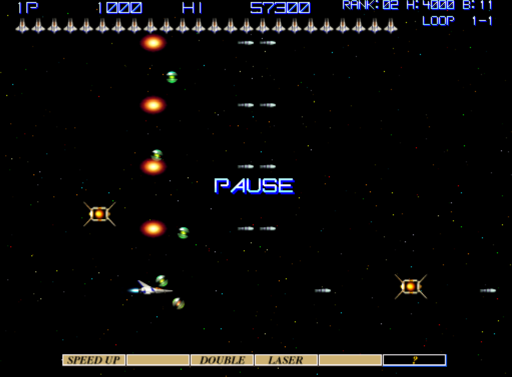 On — pause with 1P-Start. On+ — also, while paused, A+B = Laser, B+C = Double, A+C = Normal, each with full powerup (speed 3, missile, option 4, reserve barrier). On — 1Pスタートでポーズ。On+ — さらにポーズ中:A+B(レーザー)、B+C(ダブル)、A+C(ノーマル)、いずれもフル装備(3速度・ミサイル・オプション4・保険バリア)。 |
Pauseポーズ |
|
SHOT auto rapid fire (hold to fire) at the selected rate. Governs the shot button only - missiles have their own Missile Auto option below (in-game row: SHOT AUTO, renamed from RAPID FIRE in v8.23). This dropdown is the power-on default (baked in / saved to NVRAM); also adjustable in-game in MOD OPTIONS > CONVENIENCE.ショットのオート連射(押しっぱなしで連射)。ショットボタン専用です。ミサイルは下の「ミサイル連射」をご利用ください(ゲーム内の行名はv8.23でRAPID FIRE→SHOT AUTOに変更)。ここで選ぶ連射速度は電源投入時の初期値(焼き込み/NVRAM保存)。ゲーム内のMOD OPTIONS > CONVENIENCEでも調整可能。
|
Shot Auto Rapid Fire (Hz)ショット連射 (Hz) |
|
Missile rapid fire while the button is held: shortens the missile re-fire cooldown (stock 10 frames = 6/s) to the chosen rate. In open space the effect is small (the game allows one missile in flight per source), but at POINT BLANK - an option overlapping a boss weak point, where each missile connects instantly - this is a large DPS upgrade (up to 5x volley rate), the classic option-stacking technique without external rapid-fire hardware. DYN: applies to all missile types except F.Torpedo (which keeps its pulse-controlled modes). ALL: applies to F.Torpedo too (denser streams; combines with F.TORPEDO AUTO). Sets the power-on default; also switchable live in MOD OPTIONS.ミサイルボタン押しっぱなしでの連射:ミサイルの再発射クールダウン(元は10フレーム=毎秒6発)を選択レートまで短縮します。通常の空間では効果は小さいですが(1発射源につき1発まで)、オプションをボスの弱点に重ねるような密着状態ではミサイルが即着弾してすぐ次を撃てるため、大幅なDPS向上(最大約5倍)になります。外部連射装置なしでオプション重ねテクニックが使えます。DYN:F.トーポ以外の全ミサイルに適用(F.トーポは手動操作のまま)。ALL:F.トーポにも適用(F.TORPEDO AUTOと併用可)。電源投入時の初期値で、ゲーム内MOD OPTIONSでも切替可能。
|
Missile Autoミサイル連射 |
|
Fire rate for Missile Auto (shots per second). Active when Missile Auto is DYN or ALL.ミサイル連射の速度(毎秒発射数)。Missile AutoがDYNまたはALLのとき有効。
|
Missile Auto Rate (Hz)ミサイル連射速度 (Hz) |
Interfaceインターフェース | |
 Std — stock (up to 9 life icons). Num — numeric readout. Dyn — dynamic: icons up to 9, numeric at 10+. Std — 通常(残機アイコン最大9)。Num — 残機を数字表示。Dyn — 動的:9機まではアイコン、10機以上は数字。 |
Life Display残機表示 |
|
Show the loop/stage indicator (e.g. LOOP 1-3).ループ・ステージ表示(例:「LOOP 1-3」)をHUDに表示。旧DIPSW4ガジェットの代替。ゲーム内のMOD OPTIONSで切替(ここは電源投入時の初期値)。
|
Show Stage/Loopステージ・ループ表示 |
|
Show per-frame data including RANK, Option Hunter timer, Blue Capsule Counter.毎フレームのデバッグ情報(ランク・オプハンタイマー・青カプセルカウンター)をHUDに表示。旧DIPSW5ガジェットの代替。ゲーム内のMOD OPTIONSで切替(ここは電源投入時の初期値)。
|
Show Per-Frame Dataフレームデータ表示 |
|
Music volume percent (sound effects unchanged) — rebalance BGM vs SFX like the PS2 port did. 100 = stock mix. Applies to every song via the sound driver's per-bank attenuation; adjustable in-game in MOD OPTIONS > INTERFACE, where a sample BGM + SFX play while the row is selected so you can hear the balance. This dropdown is the power-on default.BGM音量パーセント(効果音は変化なし)。100=オリジナルのミックス。ゲーム内のMOD OPTIONS > INTERFACEでも調整可能(選択中はサンプルBGMと効果音が再生され、バランスを聴き比べられる)。ここは電源投入時の初期値。
|
BGM VolumeBGM音量 |
Bugfixesバグ修正 | |
|
Fix the "Holoscope" → "Horoscope" typo.「Holoscope」→「Horoscope」の誤字を修正。
|
Fix Typosスペルミスを修正する |
|
Fix Twin Laser doing almost no damage to boss cores and parts: Twin Laser uses the same special boss-part collision test as Ripple Laser, but its hitbox for that test is never initialized, so each beam hits boss parts as a ~1-pixel point (damage depends on screen position; zero from some spots). This makes the test use the beam's real 25x5 hitbox. Other weapons and normal enemies are unaffected. This sets the power-on default; it can also be toggled live in the in-game TEST MENU (MOD OPTIONS). Leave OFF to keep the original behavior.ツインレーザーがボスのコアやパーツにほとんどダメージを与えられない問題を修正:ツインレーザーはリップルレーザーと同じ対ボスパーツ特殊判定を使いますが、その判定用の当たり判定が未初期化のため、ビームが約1ピクセルの点として扱われます(画面位置によってはダメージゼロ)。本来の25x5の当たり判定を使うようにします。他の武器や通常の敵には影響しません。ここは電源投入時の初期値で、ゲーム内のTEST MENU(MOD OPTIONS)でも切替可能。元の挙動のままにしたい場合はOFF。
|
Twin Laserツインレーザー |
|
F.Torpedo (TYPE 6 missile) behavior. FIX: with external rapid-fire units, every rate except 20Hz made the torpedo spawn "floated" one missile-height up and fire late - the game's climb logic misses button releases during its first 3 frames, so a release+re-press reads as a continuous hold. FIX makes the torpedo climb only while the button is genuinely held since firing: all rapid rates now behave identically; hold-to-float is unchanged. AUTO: additionally, HOLDING the missile button streams straight (non-floating) torpedoes continuously - no rapid-fire hardware needed - at the cost of hold-to-float (tap-and-hold floating is unavailable while AUTO is selected). This sets the power-on default; also switchable live in MOD OPTIONS.F.トーポ(6番装備ミサイル)の挙動。FIX:外部連射装置では20連以外のすべてでミサイルが1発分浮いて発射も遅れていました。上昇処理が発射後3フレームの間ボタンの離しを見ないため、離して押し直しても押しっぱなしと誤認されるのが原因です。FIXでは発射以降ボタンを本当に押し続けている間だけ上昇するようになり、どの連射速度でも同じ挙動になります(押しっぱなしでの浮遊はそのまま)。AUTO:さらに、ミサイルボタンを押しっぱなしにするだけでまっすぐなミサイルを連続発射します(連射装置不要)。ただしAUTO中は押しっぱなし浮遊は使えません。ここは電源投入時の初期値で、ゲーム内MOD OPTIONSでも切替可能。
|
F.Torpedo (Stock / Fix / Auto)F.トーポ(Stock/Fix/Auto) |
Download Patched ROM改造したロムをダウンロード
Get your patched ROM here.ここから改造済みROMを入手してください。
No result.